Free · Source available · Windows · macOS · Linux

Opens in a third of a second. Free to use, source available. No account needed. No additional AI required.

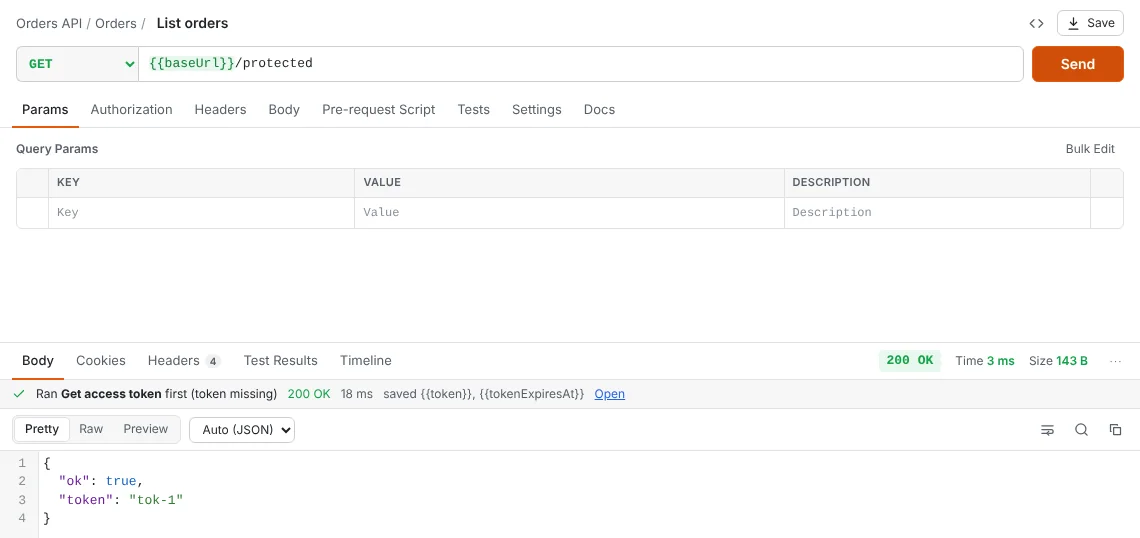
HttpDash sending a request. A banner reads: Ran Get access token first (token missing), 200 OK, saved token.
The login ran on its own because the token was missing, then the request went through.

Performance

Fast from the first click

No sign-in, no cloud sync, no waiting. Every number here was measured, and the benchmark is a script you can run yourself.

  • 0.3 s from launch to a ready window, and under half a second with 6,000 requests
  • 16× faster than Postman's collection runner on 500 requests with scripts and tests
  • 0 accounts, sign-ins or cloud syncs between you and your first request

Collection runner throughput

Requests per second, running 500 requests that each have a pre-request script and two tests. Higher is better.

HttpDash 1,545/s HttpDash 1.4.00.32 s for 500 requests107 MB peak memory
Postman (Newman) 97/s Newman 6.2.35.14 s for 500 requests253 MB peak memory
Bruno (CLI) 11/s Bruno CLI 4.2.143.78 s for 500 requests427 MB peak memory
How we measured, and all the numbers
RunnerTotal timeRequests/sPeak memory
HttpDash 1.4.00.32 s1,545107 MB
Postman's Newman 6.2.35.14 s97253 MB
Bruno CLI 4.2.143.78 s11427 MB

Each runner ran the same 500 GET requests against a local JSON endpoint. Every request had a pre-request script that sets a variable, and a test script with two assertions. The figures are the median of five runs after a warm-up, with peak memory from /usr/bin/time. Measured in October 2026 on an Apple M5 Mac with 16 GB of memory. Start-up time is from launch to a window showing the workspace.

To reproduce it, clone the repository and run npm run bench. See the benchmark script.

Built for real APIs

Less setup. Fewer 401s. No copy-pasting tokens.

Tokens that refresh themselves

Point a collection at its login request once. Before every call, HttpDash checks the token: if it's missing or about to expire, it runs the login first, saves the new token, and sends your request. If a server still answers 401, it refreshes and retries.

  • Reads the token from any JSON path, such as data.jwToken
  • Knows when a JWT expires, or uses expires_in
  • Works the same in the runner, monitors and the CLI
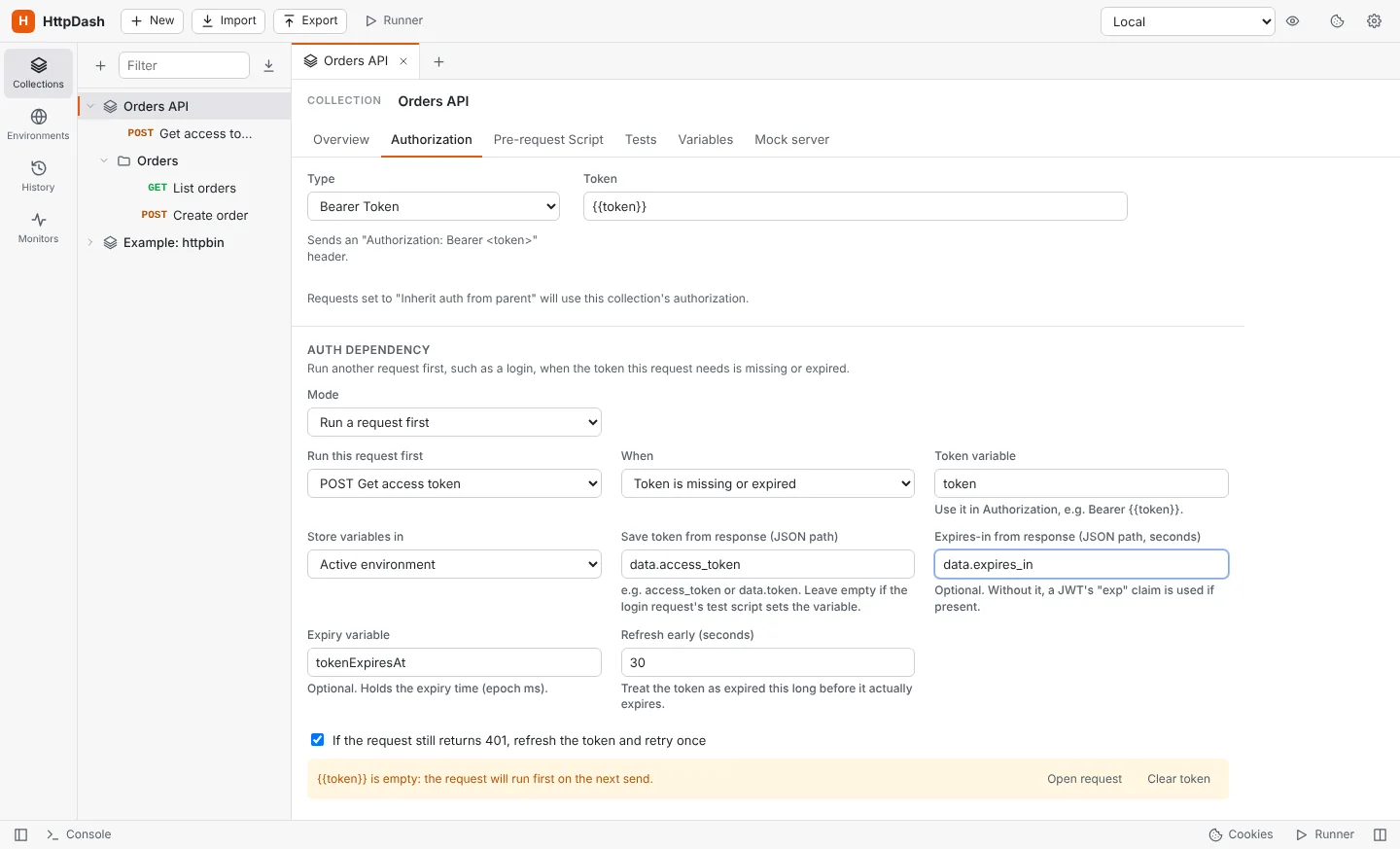
Auth dependency settings: run Get access token first when the token is missing or expired, save the token from data.access_token.

Environments from your service registry

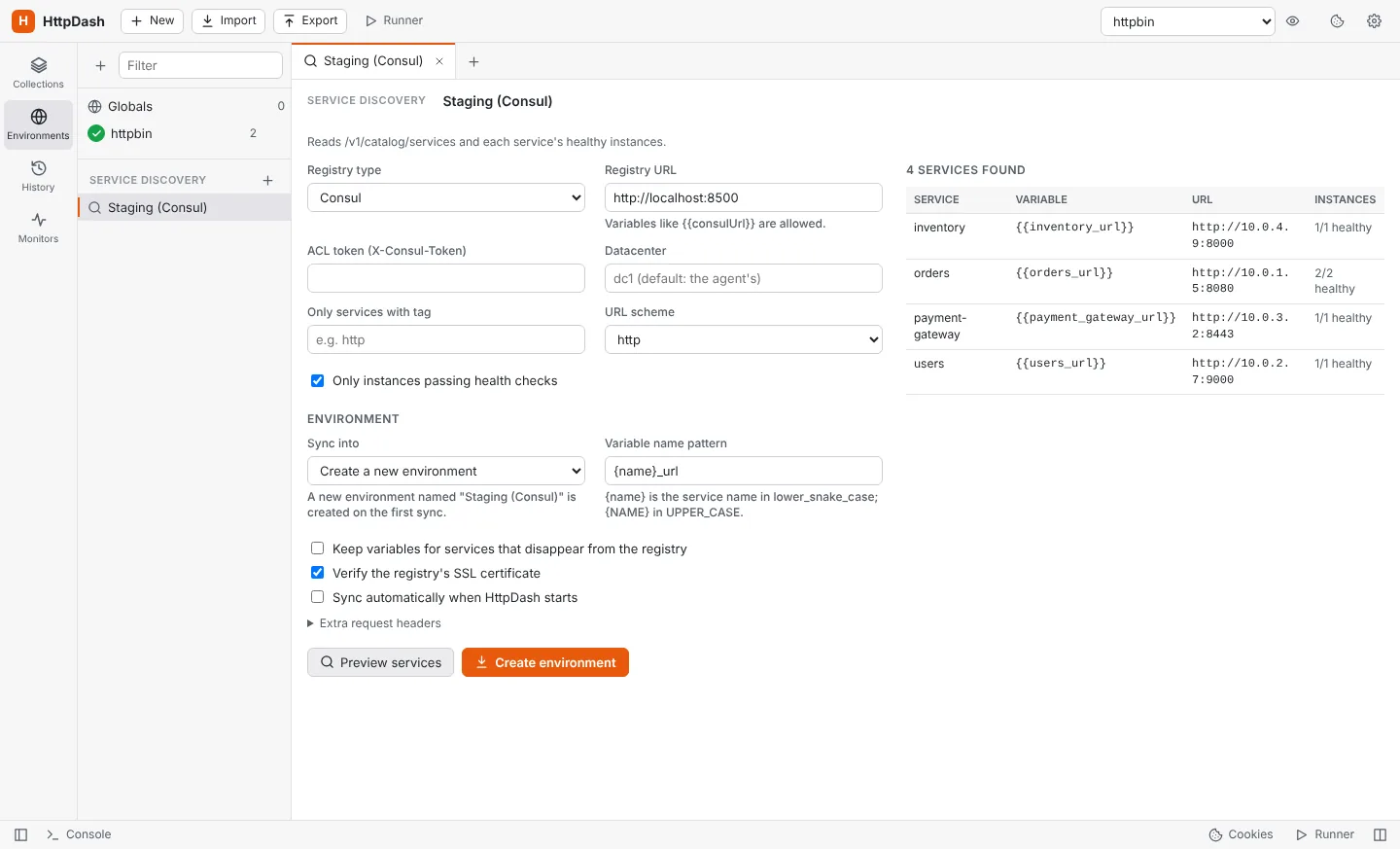
Connect Consul, Eureka, Kubernetes or your own JSON endpoint, and HttpDash creates an environment with one variable per service, like {{orders_url}}. Re-sync whenever services move: addresses update, new services appear, and the variables you added yourself stay put.

  • Healthy instances only, with tag and namespace filters, or every pod behind a Kubernetes Service
  • Point it at an OpenAPI document and every operation becomes a request, kept in step with the spec
  • Each new version of the spec is compared with the last: review what changed, then apply it, with your own edits kept
Service discovery preview listing four services from Consul with their variables and URLs.

Find the slow instance, or the slow payload

Send to each instance of a service in turn and HttpDash counts what every one of them answers: requests, p50 and p95 times, errors. Give a request several payloads and it counts those too, so a pod that is slow for everyone can be told apart from an order that is slow on every pod.

  • Flags instances that are slow or failing, and payloads that are worse than their siblings
  • Behind a load balancer, counts by the header that names who answered, such as X-Served-By
  • Export the report to Excel, CSV, PDF, an image or Markdown
Traffic by instance for a Consul cluster: orders-2 flagged failing, orders-3 flagged slow at 312 ms, and by payload, a large payment flagged slow at 370 ms while other payloads answer in about 20 ms.

See what the server went through

Give a request, a folder or a whole collection a health URL, and HttpDash reads it before the request goes out, while it is in flight and after it answers. The Health tab shows what moved while your request ran: connections held, queues, a database pool filling up, a service that stopped saying it was healthy.

  • A path such as /healthz is read on the instance the request went to
  • Before, during and after for every field that changed, with a chart of each over time
  • In the Runner, the CLI and the AI API too, and it never fails the request itself
The Health tab for a 610 ms request: healthy throughout, with requests in flight rising from 0 to 10 and the database pool filling while it ran, each field charted over time.

Compare every instance of a service

One click sends the same request to every instance behind a service and puts the answers side by side. HttpDash finds the instances in your registry, or in every address the host name resolves to, and points out the one that answered differently: an old version, a missing field, a different state.

  • Instances come from Consul, Eureka, Kubernetes or DNS, refreshed when you compare
  • Tells an odd one out from a split, and ignores dates, timestamps and IDs made on the spot
  • Ignore the headers and JSON paths that are meant to differ
Compare for Get order across three instances: orders-3 answered differently from the other two, with version 2.3.0 instead of 2.4.1, no qty field and state planned instead of released.

Trace where every request went

Every response shows where it went on the network: the name's aliases and every address it resolves to, the address it connected to split into octets with its segment, its reverse-DNS name, and the adapter your request left from. One click traces the route, router by router.

  • Private, VPN, loopback and public addresses told apart, and your own segment marked
  • Split DNS and proxies called out, so the address you see is the one you think it is
  • Traffic by network segment, to find a slow data center rather than a slow pod
The Network section for orders.mes.corp: an alias of orders-lb.dc2.mes.corp, resolving to three addresses on two segments, connected to 10.43.1.9 on 10.43.1.0/24, and a route of four hops.

Reach services behind the firewall

Services on a plant network, in a data center or inside a cluster are one tunnel away, without a VPN. Point HttpDash at an SSH jump host or a SOCKS5 proxy, list the hosts it carries, and every request to them goes through it, with their names resolved on the far side.

  • SSH runs with your own keys, agent and ~/.ssh/config, and never waits for a password
  • Send by host (*.mes.corp, 10.42.0.0/16) or put a whole environment through one tunnel
  • Discovery, the Runner, Monitors, Compare and the CLI go through it too
Settings, Tunnels: an SSH jump host named Plant network carrying *.mes.corp and 10.42.0.0/16, open, with orders.mes.corp:7001 reached through it in 2 ms.

Let AI agents work in HttpDash

Claude and other AI agents can use HttpDash the way you do: find requests, send them, add and update them, start runs and read the results, and look at the screen. They connect through an OpenAPI document or MCP, on your own computer only, and you decide what they are allowed to do.

  • 30 operations, described in an OpenAPI 3.1 document, or httpdash mcp for MCP clients
  • Separate permissions to read, run, edit, use the screen and see secrets
  • Instead of curl: an agent tests endpoints with your logins and keeps the ones that work, as saved requests
  • A status bar light while an agent works, and a history of every call it made
The AI access panel while an agent is working: calls from Claude Code to search requests, update a request, send it (200 in 21 ms), start a run and take a screen snapshot.

Every version you sent, and a warning when the spec moves on

Each request you send by hand is kept as a version, with the response it got. Switch back to one in a click, rename it, tag it and find it in search. When the OpenAPI document the request came from changes, HttpDash tells you what no longer fits before you send it.

  • Versions keep the URL, parameters, headers, body and the response
  • Flags missing required parameters and fields, unknown ones, and values outside an enum
  • Collection runs don't add versions, so the list stays yours
A List lots request with a warning that it does not fit Lots API 2.0.0: the required query parameter status is missing and state is not in the spec. The versions menu is open with two earlier versions marked with a warning.

Find any request by name, URL or tag

Give requests as many tags as you like, and HttpDash suggests the ones you already use. The search box knows every name, URL, method and tag in your workspace, so you pick from a list instead of remembering what you called it.

  • Combine tags with text, such as #smoke and “pay”
  • Pick what a run includes from the folder tree, or by tag
  • Run only the tagged requests in CI with httpdash run backup.json --tag smoke
Searching for pay with the smoke tag selected: suggestions grouped as tags, URLs and request names, and the Take payment request with its tags.

Send exactly what you mean

Requests leave from a native HTTP client, not a browser, so every header goes out as typed, including Referer, Origin, User-Agent, Host and Cookie. The timeline shows the exact request that was sent and how long each step took.

  • JSON, XML, form-data with files, URL-encoded, binary and GraphQL bodies
  • Basic, Bearer, API key, Digest, OAuth 2.0 and AWS Signature auth
  • Paste a cURL command into the URL bar to import it
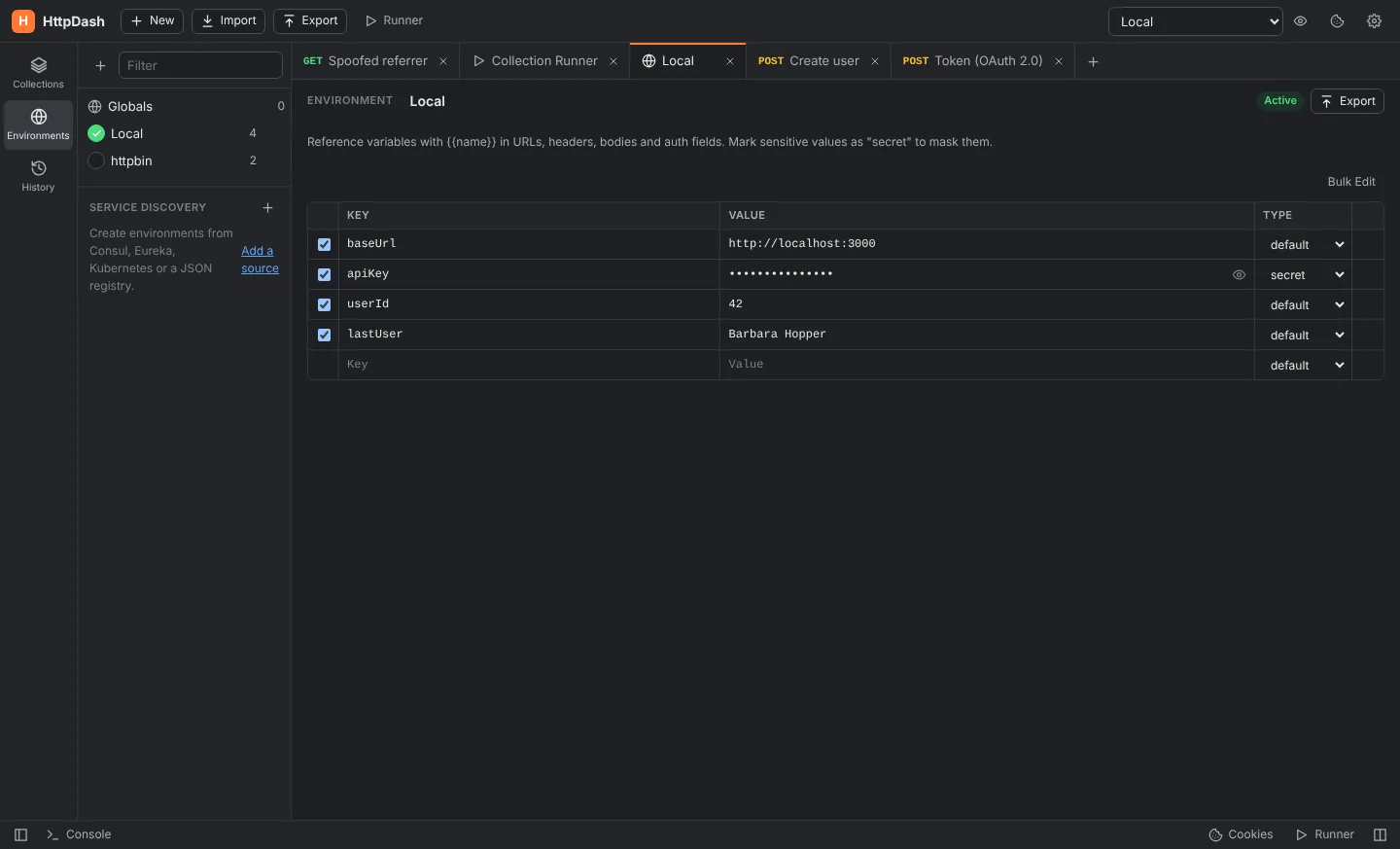
HttpDash in dark mode showing an environment with masked secret values.

Read any JSON response as a table

Switch a response to Table and arrays of objects become sortable tables, with a column for every key. Nested objects and arrays open in place, so you can drill into items or address without leaving the row.

  • Filter rows as you type; sort any column
  • Export to Excel, CSV or a PNG image, following your filter and sort
  • Virtual rendering: 100,000 rows open in about a tenth of a second
The Table view: 128 orders sorted by total, with one order's items and shipping address expanded as nested tables.

WebSocket, with a live message log

Connect to ws:// and wss:// servers, send text or JSON, and watch everything that goes each way with timings and sizes. The handshake carries your headers and the collection's auth, so authenticated sockets just work.

  • Saved messages you can resend with one click
  • Click any message to see it pretty-printed
  • Client certificates, your proxy and {{variables}} apply
A WebSocket connection to a live orders feed: a welcome message, a subscribe message, and three order events, one shown pretty-printed.

Streaming responses, as they happen

When an API streams Server-Sent Events, as AI APIs do, HttpDash shows each event the moment it arrives instead of waiting for the end. Stop whenever you like and keep what came in.

  • Works with any method and body, so streaming POSTs just work
  • An Events view with timings, names and ids
  • Parsed exactly the way browsers do
A streaming POST to a messages endpoint: 24 events arriving over 620 ms, one expanded to show its JSON.

Everything in one app

From the first request to the nightly check

  • Collections & environments

    Folders, tabs, history, globals and secret variables with {{autocomplete}} and hover previews. Give each environment a color so you always know where you are sending.

  • Scripts & tests

    Pre-request and test scripts with a familiar pm API, Chai assertions, JSON Schema checks and a snippet library.

  • Collection runner

    Pick the requests to run from a tree or by tag, then iterations, CSV/JSON data files, a gap in milliseconds between requests and a detailed, exportable report.

  • Mock server

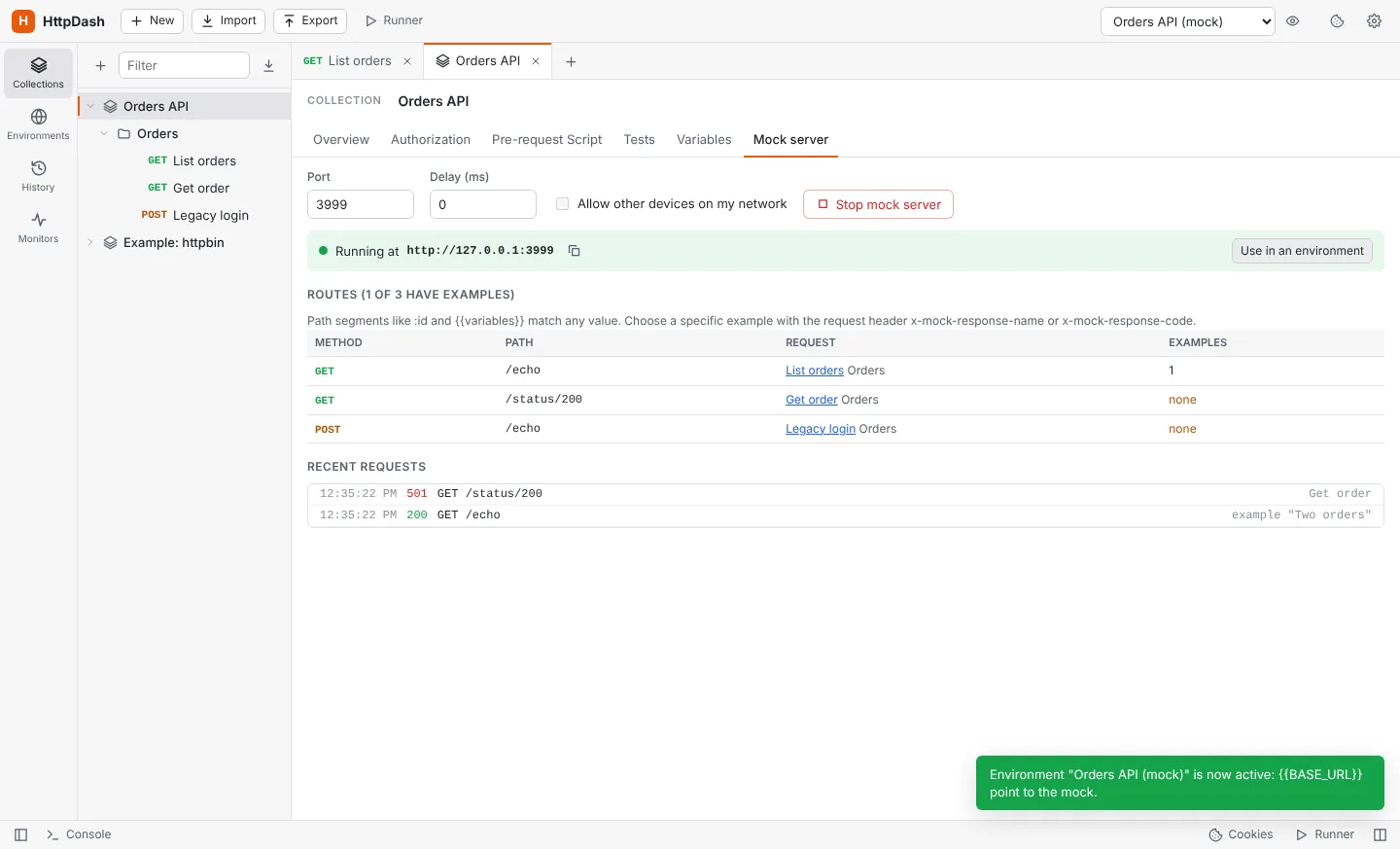
    Serve saved examples on a local port, pick responses with a header, and switch an environment to the mock in one click.

  • Monitors

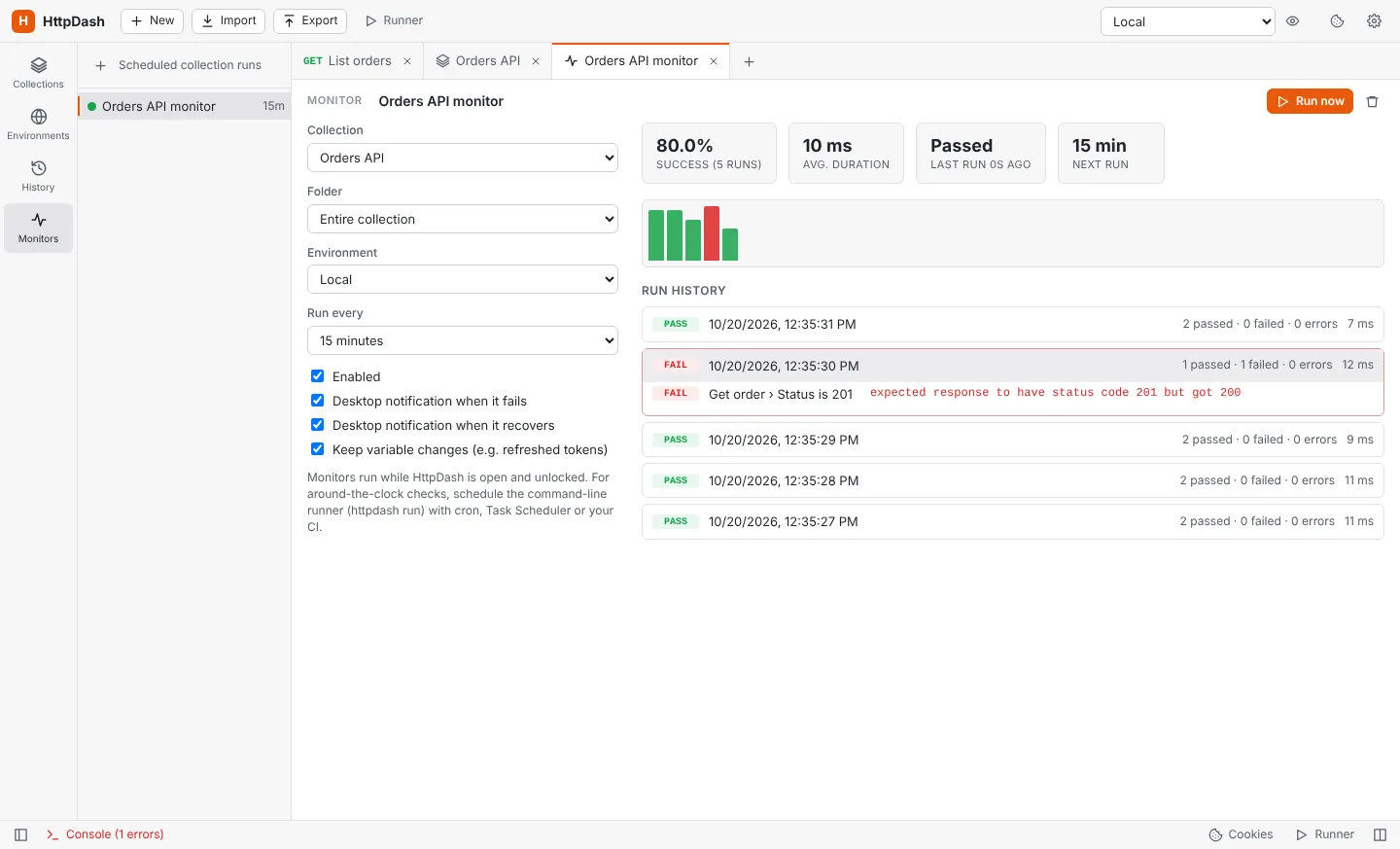
    Run a collection every few minutes and get a desktop notification when it fails, and again when it recovers.

  • Code generation

    Turn any request into cURL, fetch, Axios, Python, Go, PHP, C#, Java, PowerShell, wget or raw HTTP.

  • Import & export

    Bring in Postman collections, OpenAPI and Swagger (JSON or YAML) and cURL. Export everything as a backup, or as portable collection files.

  • Team sharing through git

    Share collections and environments through any git repository. One readable file per request, merges that just work, and secrets that never leave your computer.

  • WebSocket

    Connect, send text or JSON, and follow a live log of every message, with your headers and auth in the handshake.

  • Streaming responses

    Server-Sent Events appear as they arrive, so streaming and AI APIs are easy to watch and debug.

  • Table view & export

    Read JSON arrays as sortable tables and export them to Excel, CSV or an image.

  • OpenAPI sync

    A collection that follows your OpenAPI document. Each new version shows what changed, operation by operation, before you apply it.

  • Load balancing

    Send to the first instance, each in turn or a random one, from Consul, Eureka or Kubernetes pods. Unhealthy instances are skipped.

  • Payloads

    Give a request the variations it should be called with, typed in or imported from CSV or JSON, and send them in turn or at random.

  • Traffic reports

    Requests, timings and errors per instance and per payload, live, with slow and failing ones flagged. Export to Excel, PDF or an image.

  • Compare instances

    Send one request to every instance of a service, from your registry or DNS, and see which one answered differently.

  • AI agents

    An OpenAPI document and an MCP server let AI agents search, send, edit and run requests, with permissions you set and a history of every call.

  • Request versions

    Every request you send by hand is kept with its response. Rename, tag and search versions, and get a warning when the spec no longer fits.

  • Tags & search

    Any number of tags per request, suggested as you type, and one search across names, URLs, methods and tags.

  • Health while it runs

    Read a service's health endpoint before, during and after each request, and see which fields moved while it answered.

  • Network trace

    Every address a name resolves to, the one it went to in octets and segments, your adapter, and the route hop by hop.

  • Auth dependencies

    Run the login first when the token is missing or expired, save the new token and send your request, without copying anything.

  • Service discovery

    Environments built from Consul, Eureka, Kubernetes or an OpenAPI document, and kept in step with every sync.

  • Tunnels

    Reach private networks through an SSH jump host or a SOCKS5 proxy, by host or for a whole environment, without a VPN.

  • Command line

    Run collections in CI with JUnit reports, tags, data files and tunnels, or send one request like curl with httpdash send.

  • Secret scan

    Finds keys, tokens and passwords typed straight into requests and moves them into masked variables in one click.

  • App lock

    Require a directory (LDAP) sign-in to open HttpDash, limit it to a group, and lock it when idle.

  • Client certificates

    Mutual TLS per host, your company's CA, and certificates already installed on your computer, trusted as in a browser.

Automation

Know when an API breaks before your users do

A monitor with 80% success over 5 runs, a duration chart and the failed test highlighted.
Monitors keep a history of every run with the exact test that failed.
Mock server running on port 3999 with its routes and recent requests.
Mock servers stand in for an API that's down or not built yet.

Command line

Run the same collections in CI

Export your workspace without secrets, commit it, and run it anywhere Node.js runs. Pass credentials as variables, get JUnit reports your pipeline already understands, and fail the build when a test fails.

  • Auth dependencies and scripts behave exactly as in the app
  • CLI, JSON and JUnit reports
  • Exit code 1 on any failed test or request
  • httpdash send: one request like curl, through the running app, kept with --save
$ npm install -g github:gethttpdash/httpdash
$ httpdash run backup.json -e "QA" --env-var password=$PASS -r cli,junit

HttpDash  Orders API  (environment: QA)

→ List orders
  GET https://qa.example.com/orders [200 OK, 8.6KB, 91ms]
  ↳ ran "Get access token" first (expired) 200
  ✓ Status is 200
  ✓ Returns a list of orders

Total time 412 ms. PASSED

Security & privacy

Your requests, your machine, your rules

HttpDash has no account and no cloud sync. Collections, environments and history live in a folder on your computer.

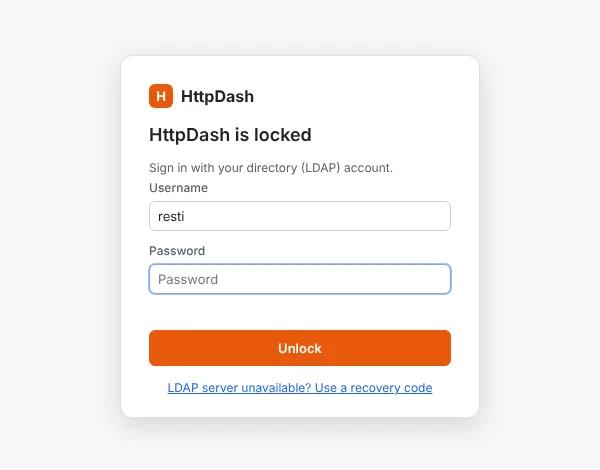
The HttpDash lock screen asking for an LDAP username and password.
  • Lock it with your directory

    Require an LDAP sign-in to open the app, limit it to certain users or a group, and lock it after a period of inactivity. While locked, the app shows no data at all.

  • Find secrets before they leak

    The secret scan spots keys, tokens and passwords typed straight into requests and moves them into masked variables with one click.

  • Share without credentials

    Exports can leave out every secret, token and password, while keeping {{variable}} references intact.

  • A record of what happened

    A local audit log notes sign-ins, exports, imports, runs and requests, keeping only method, host, path and status.

Download

Get HttpDash

Pick your platform. Your collections, environments and settings carry over when you update.

Windows

Windows 10 and 11, x64 and ARM64. Installer or portable app.

Download for Windows

Not signed yet: if SmartScreen appears, choose More info → Run anyway.

macOS

Apple Silicon and Intel. Disk image or zip.

Download for macOS

Not notarized yet: if macOS blocks it, open System Settings → Privacy & Security and click Open Anyway.

Linux

x64 and ARM64. AppImage for any distribution, or a .deb for Debian and Ubuntu.

Download for Linux

AppImage: chmod +x HttpDash-*.AppImage, then run it.

Command line

For CI servers and schedulers. Needs Node.js 22 or later.

npm install -g github:gethttpdash/httpdash

Then run httpdash run --help.

Free, and staying that way

Help keep HttpDash free

No account, no ads, no paid tier. Buy me a coffee if HttpDash saves you time, or sponsor it as a company.